
Thank you for coming to the 2025 AGM!
The AGM is where the UVSS makes critical decisions about the governance, finance, and operations of YOUR student society. If you’re a registered undergrad student, you’re already a member and you get to vote on these big decisions. Come learn what we’ve been doing for students, and have your say! This is a great opportunity to get involved with your students’ society and get to know what we are doing with your student fees.
WE’VE GOT PRIZES!
Just for signing in, you’re automatically entered to win some AWESOME prizes.
We gave away:
- A Baggu medium crescent bag
- $100 to Thrifty Foods
- AIRPODS!
Draft Minutes
Read the draft minutes here!
Special Resolutions (AGM 2025 Motions)
Bylaw 1 – For Credit Course Coverage Changes
Bylaw 2 – Faculty Representatives Changes
Bylaw 3 – Duties and Responsibilities of Directors
Issues Policy 1 – Decolonization Policy
HOW TO JOIN THE AGM
Instructions to join the AGM:
Step 1: Join us on Zoom by clicking on the provided link below:
https://us06web.zoom.us/j/86022252752?pwd=Lv62Z3dRajXsYoM2mDVNzc5ATKz61K.1
Meeting ID: 860 2225 2752
Passcode: 877083
Step 2: Once you join, you will be placed in a waiting room. Here, you will see a link to the verification form.
Form link here
Step 3: Fill out the form with your name, email, and V number. This is to confirm your current UVIC status and ensure that only current students are able to attend the meeting. Please note that your information will remain confidential and will only be accessed by UVSS staff.
Step 4: After submitting the form, your information will be verified, and you will be allowed to enter the meeting.
Note: To ensure a smooth verification process, please use the name on your One Card when joining the meeting and have your UVIC V number readily available.
Important information:
Please ensure you are logged into your UVic SSO in order to be admitted to the meeting.
|
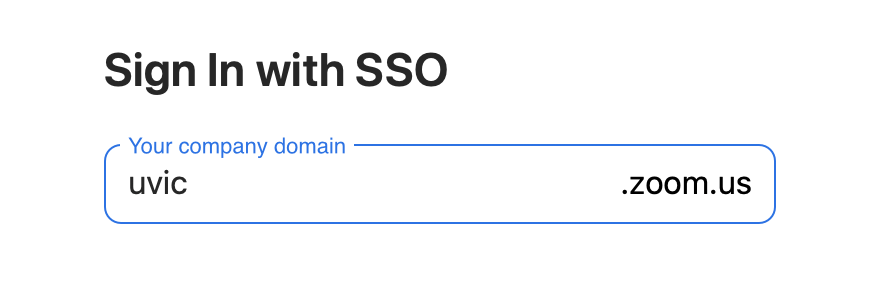
2. Enter “uvic” as your company domain, then click “continue.” 3. You will then be prompted to enter your Netlink ID and password. |